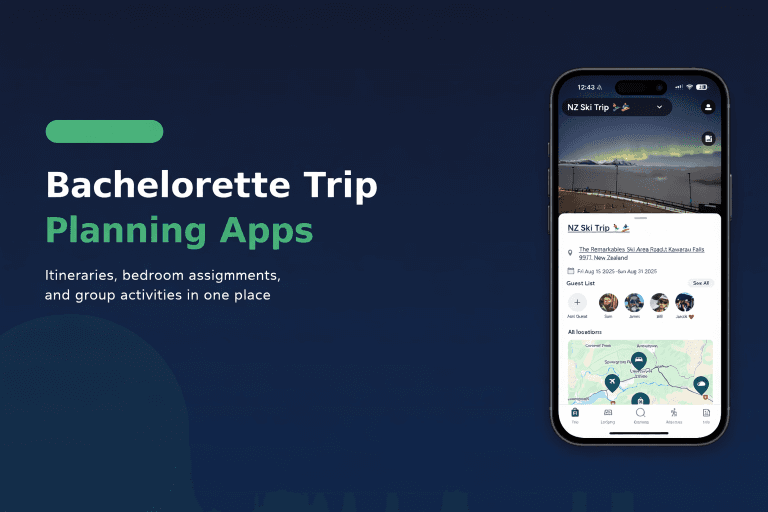
The best group travel planning app in 2026 depends on what your group actually struggles with. AvoSquado is the strongest option for coordinating a trip with multiple people — it’s the only app here built around group commitment, shared accommodations (including bedroom assignments), and booking activities together, and it’s completely free. Wanderlog is the best map-based itinerary builder. TripIt is the best organizer for solo and business travelers with lots of confirmation emails. Troupe handles group voting but stops at the decision phase. Splitwise splits expenses but doesn’t plan anything.
We compared all five across the things group trips actually break on: getting people to commit, dividing up the rental, agreeing on activities, and settling up. Here’s the full breakdown.
| AvoSquado | Wanderlog | TripIt | Troupe | Splitwise | |
|---|---|---|---|---|---|
| Built for groups | Yes — every feature assumes multiple decision-makers | Partial — collaborative itinerary editing | No — solo/business focus | Yes — but voting/decisions only | No — expenses only |
| Group voting & commitment | Yes (dates, stays, activities; RSVP via join codes) | No | No | Yes (polls, ranked voting, RSVPs) | No |
| Bedroom assignment for shared rentals | Yes | No | No | No | No |
| Itinerary builder | Yes, collaborative | Yes, map-based (best in class) | Yes, auto-built from forwarded emails | No | No |
| Book activities in-app | Yes — 400,000+ experiences via Viator, no markup | No — organizes bookings made elsewhere | No | No | No |
| Expense splitting | Yes — group-aware (splits based on who attends each part) | Budget tracker | No | No | Yes (core feature) |
| Offline access | — | Pro only | Yes | — | — |
| Price | Free, no paid tier | Free; Pro $39.99/yr (offline maps, AI assistant, exports) | Free; Pro $48.99/yr (flight alerts, seat tracker) | Free | Free tier; paid Pro tier |
| Best for | Group trips of 4–30: bachelorettes, reunions, ski trips | Road trips and map-first planners | Business travelers with many bookings | Groups stuck on “where and when” | Settling up after the trip |
Pricing verified June 2026 against each app’s official listing. TripIt Pro is $48.99/yr per its App Store and Google Play listings (often rounded to $49 elsewhere).

What to Look for in a Group Travel Planning App
The best group travel planning apps share these key features. Before downloading five different apps, know what actually matters:
Collaborative itinerary building — Everyone should be able to add ideas, not just the “trip planner” friend who gets stuck doing all the work.
Group commitment tools — Voting on dates and destinations, RSVPs, and join codes that let people see the plan before they’re locked in. Trips die when nobody commits.
Accommodation coordination — Where is everyone sleeping? What’s the WiFi password? What time is check-in? This info needs to live somewhere other than a buried text message.
Activity booking — The best apps let you browse and book tours, excursions, and activities without juggling 10 browser tabs.
Works for your group size — Some apps cap participants or charge per person. Check before you invite 20 people.
Actually easy to use — If your least tech-savvy friend can’t figure it out, you’ll end up answering questions the whole trip.
Best Group Travel Planning Apps Compared
1. AvoSquado — Best for Friends & Family Trips
Best for: Bachelorette trips, family reunions, beach house weekends, ski trips
Price: Free — no subscription, no paid tier
Standout feature: Built-in bedroom assignments and 400,000+ bookable activities
AvoSquado is built specifically for the chaos of planning trips with friends and family. The standout feature that no other app has: bedroom assignments. If you’ve ever rented a beach house with 12 people and watched the passive-aggressive “so… who’s taking the master?” conversation unfold, you get why this matters.
Beyond solving the sleeping situation, AvoSquado integrates with Viator to offer 400,000+ bookable tours and activities directly in the app — at the same price as booking direct, with no markup. Wine tours in Napa, snorkeling in Hawaii, cooking classes in Rome—find it, book it, and it’s automatically added to your shared itinerary.
It’s also built around getting the group to actually commit: members join with a code (and can view the trip before creating an account), vote on dates, stays, and activities, and split expenses in a group-aware way — costs are divided based on who attends each part of the trip, not blanket-split across everyone. Accommodation details (check-in times, door codes, house rules, WiFi passwords) live in one place, and everything displays in the destination’s timezone so nobody shows up an hour off.
Pros:
- Bedroom assignments (literally no other app does this)
- 400,000+ bookable activities via Viator integration, no markup
- Group voting and join codes — built for commitment, not just lists
- Group-aware expense splitting based on who attends what
- Accommodation details in one place
- Collaborative itinerary everyone can edit
- Free, with no paid tier or feature limits
- Clean, intuitive interface
Cons:
- Newer app, still building features
- No flight booking integration yet
Best for: Groups renting houses, cabins, or villas where room assignments matter. Bachelorette trips, family reunions, friend group getaways.
2. Wanderlog — Best Map-Based Itinerary Builder
Best for: Road trips, budget travelers, map-first planners
Price: Free (Pro: $39.99/year)
Standout feature: Map-based itinerary building and route optimization
Wanderlog shines when your trip involves driving. The map-first interface helps you visualize your route, optimize stop order, and estimate drive times between destinations — genuinely best-in-class for itineraries. If you’re planning a Pacific Coast Highway road trip or hopping between European cities, the visual planning is excellent, and live collaboration lets multiple people add restaurants, attractions, and hotels to a shared list.
In 2026, the $39.99/year Pro plan bundles an AI travel assistant (the free tier caps it at 5 AI messages per trip) along with offline maps, route optimization, and PDF export. The free tier still covers the core itinerary features.
Wanderlog’s gap for groups: there’s no voting or commitment flow, no bedroom assignment, and it doesn’t process bookings — it organizes ones you’ve made elsewhere. Some users also report the app slows down on large trips with many stops.
Pros:
- Excellent map and route visualization — best in class
- Live collaboration on a shared itinerary
- Budget tracking built in
- Free tier covers core planning
- Import reservations from email
Cons:
- No group voting or commitment features
- No activity booking — organizes bookings made elsewhere
- No accommodation coordination or bedroom assignment
- Offline maps and AI assistant require Pro ($39.99/year)
- Can slow down on large trips
Best for: Road trips where route planning matters. Groups who want to visualize the journey on a map.
3. TripIt — Best for Business Travelers
Best for: Frequent flyers, business trips, individual travelers
Price: Free (Pro: $48.99/year)
Standout feature: Auto-import from email confirmations
TripIt has been around forever, and for good reason — roughly 20 million travelers use it. Forward your flight, hotel, and rental car confirmation emails to TripIt, and it automatically builds your itinerary. No manual entry required.
The Pro version ($48.99/year per its official App Store and Google Play listings) adds real-time flight alerts, seat tracking, and gate change notifications—useful for frequent travelers. But here’s the thing: TripIt is designed for individual travelers, not groups. You can share an itinerary, but there’s no real collaboration. No shared planning, no group decisions, no expense splitting.
Pros:
- Email forwarding automatically creates itinerary
- Flight alerts and gate change notifications
- Trusted by ~20 million travelers
- Clean timeline view of your trip
Cons:
- Designed for solo/business travel, not friend groups
- No collaborative planning or group decisions
- No activity booking
- No expense splitting
- Pro tier costs $48.99/year
Best for: Business travelers and frequent flyers who want automatic itinerary organization. Not ideal for group trips.
4. Troupe — Best for Deciding Where and When
Best for: Groups stuck on “where should we go and when”
Price: Free
Standout feature: Polls, ranked voting, and RSVPs
Troupe (owned by JetBlue Travel Products) attacks the very first problem of group travel: getting everyone to agree. Create a trip, propose destinations and dates, and let the group vote — polls, ranked voting, and RSVPs turn “we should do a trip” into an actual decision instead of a 200-message thread.
The catch: Troupe ends where the work begins. Once your group has voted on Nashville in March, there’s no itinerary builder, no budget tracking, no activity booking, and no accommodation coordination. You’ll be back in the group chat — or another app — for everything after the decision.
Pros:
- Polls and ranked voting that actually produce decisions
- RSVPs show who’s really in
- Free
- Easy for non-technical friends
Cons:
- No itinerary builder
- No budget or expense tracking
- No activity booking
- No accommodation coordination — stops at the decision phase
Best for: Groups that can’t get past “where and when.” Pair it with a full planner — or use an app that handles both the vote and the trip.
5. Splitwise — Best for Expense Splitting Only
Best for: Splitting costs after the trip
Price: Free tier; paid Pro tier
Standout feature: Expense tracking and balance settlement
Splitwise does one thing well: tracking who owes whom. Add expenses, split them evenly or custom, and settle up at the end. It’s the default for shared expenses, and for good reason.
But here’s the key thing: Splitwise is not a trip planning app. There’s no itinerary building, no polls, no packing lists, no accommodation details, no activity booking. It’s purely for money tracking. Most groups need Splitwise plus another app for actual planning—which is why all-in-one options have emerged.
Pros:
- Best-in-class expense splitting
- Multiple currency support
- Integrates with payment apps for settlement
- Everyone already knows how to use it
Cons:
- Only handles expenses—no trip planning features
- No itinerary building
- No accommodation coordination
- No activity booking
- You’ll need another app for everything else
Best for: Groups who only need expense tracking and already have their planning handled elsewhere.
6. Google Docs/Sheets — The DIY Option
Best for: Control freaks, people who love spreadsheets
Price: Free
Standout feature: Total customization
Let’s be honest—plenty of groups still use a shared Google Doc or spreadsheet. You can customize it however you want, everyone can edit, and it’s free.
The downside: you’re building everything from scratch. There’s no structure, no activity booking, no room assignment features. Someone has to maintain it. And you’ll still need a separate group chat for discussions, Splitwise for expenses, and probably 15 browser tabs for booking activities.
Pros:
- Completely free
- Fully customizable
- Everyone knows how to use Google products
Cons:
- No built-in structure for trips
- No activity booking
- Manual work to maintain
- Requires multiple other tools alongside it
- Gets messy with larger groups
Best for: Small groups with a very organized trip planner who enjoys building spreadsheets.
Which App Should You Choose?
Choose AvoSquado if:
- You’re planning a trip with friends or family
- You’re renting a house/cabin/villa and need to assign bedrooms
- You want the group to vote, commit, and book activities without leaving the app
- You need everyone to have access to accommodation details
- You’re tired of group chat chaos
Choose Wanderlog if:
- You’re planning a road trip
- Route optimization matters more than accommodation coordination
- You want offline maps for remote areas (Pro)
- You’re a budget traveler who wants expense tracking
Choose TripIt if:
- You travel frequently for work
- You want automatic itinerary creation from email confirmations
- You’re primarily a solo traveler
- You don’t need group collaboration features
Choose Troupe if:
- Your group is stuck deciding where to go or when
- You want polls, ranked voting, and RSVPs
- You only need help with the decision — not the planning that follows
Choose Splitwise if:
- You only need expense tracking
- Your planning is already handled elsewhere
- You want to track shared costs for things beyond travel
Frequently Asked Questions
AvoSquado is built specifically for group trips — it handles group commitment, shared accommodations with bedroom assignments, activity voting and booking, and expense splitting in one free app. Wanderlog is the best alternative if your priority is map-based itinerary building rather than group coordination.
Yes. AvoSquado is completely free with no paid tier or feature limits. Wanderlog, Troupe, and Splitwise also have free tiers, though Wanderlog puts offline maps and its AI assistant behind a $39.99/yr Pro plan.
A dedicated group travel app. Group chats lose decisions in the scroll — apps like AvoSquado and Troupe replace the chaos with structured voting on dates, destinations, and activities, so the group actually commits instead of circling.
AvoSquado is the only major travel app with bedroom assignment — members of a trip can claim or be assigned specific bedrooms in a shared Airbnb, VRBO, or villa before anyone arrives.
In AvoSquado, yes — groups can browse and book from 400,000+ experiences via its Viator partnership at the same price as booking direct. Wanderlog, TripIt, Troupe, and Splitwise don’t sell activities; they organize plans made elsewhere.
TripIt is excellent for organizing one traveler’s bookings from confirmation emails, but it has no collaborative planning, group voting, or expense splitting. For group coordination, use an app built for it.
AvoSquado is ideal for bachelorette trips — assign bedrooms in the rental house, book group activities like wine tours, spa days, and cooking classes, and keep the whole itinerary in one place everyone can access.
The Bottom Line
When comparing the best group travel planning apps, AvoSquado offers the strongest combination of features for friend groups and families: group voting and join codes that get people to commit, bedroom assignments that no other app has, 400,000+ bookable activities, accommodation details everyone can access, and collaborative itineraries—all in one free app.
If you’re planning a road trip specifically, Wanderlog’s map-based approach is excellent. Business travelers should stick with TripIt for its email-import automation. If your group just can’t agree on a destination, Troupe’s polls can break the tie — but you’ll still need a planner once you commit.
The worst option? Trying to coordinate everything through group chat. Your trip deserves better than 200 unread messages and a friend who still doesn’t know what time to show up.
Ready to plan your next group trip?
Download AvoSquado free and get your friends from “we should do a trip” to “we’re booked” without the chaos.